How to Use Truecaller Phone Number Search?
That sinking feeling when an unknown number flashes on your screen—heart racing, wondering if it’s a friend, a bill collector, or worse, a scam. I’ve been there, staring at my phone during dinner, debating whether to answer. Truecaller phone number search changed that for me. It’s like having a quick peek behind the curtain, turning mystery calls into something manageable. With over 450 million users relying on it daily, this tool has become a go-to for spotting who’s really on the other end. In this guide, we’ll break down everything you need to know, from basics to pro tips, so you can search with confidence and reclaim some peace.
With over 450 million users worldwide and billions of phone numbers searched daily, Truecaller phone number search is one of the most popular tools for identifying callers. It helps users spot scams and manage calls faster, cutting down on unknown number anxiety by up to 80%, giving you the ability to answer with confidence and unlock peace of mind.
What is Truecaller Phone Number Search?
Truecaller phone number search is a simple way to look up any phone number and see who it belongs to, all powered by a massive community-driven database. Imagine dialing a number from a missed call or a text—Truecaller pulls up details like the caller’s name, city or country, and whether it’s flagged as spam. It’s not magic; it’s built from billions of user-reported contacts and tags.
Crowdsourced database means Truecaller collects names and numbers from users who share their contacts—it’s like a community phone book that anyone can add to without your direct permission. For many, this feature brings a wave of relief, especially in busy places where unknown calls pile up from telemarketers or fraudsters. You don’t need to be a tech whiz to use it. Just type the number, and the app or website shows results in seconds. It’s free for basic info, though premium unlocks extras like unlimited searches and profile views. The best part? It helps you decide—answer, block, or ignore—without the guesswork that leaves you uneasy.
Read to know more about Truecaller: Is truecaller safe?
How Does Truecaller Phone Number Search Work?
Truecaller phone number search taps into a crowdsourced system where users worldwide share contact details to build a shared directory. When you search, the app checks against this vast collection of reported numbers.
It starts simple: enter a full number with country code . The system scans for matches from community tags, business listings, and verified users. Results include the name, location, spam score, and even user comments like “telemarketer” or “delivery service.”
How Truecaller phone number search works:
- You enter the number.
- The app checks the database.
- Matches show name, location, and spam score.
This process feels empowering because it turns passive waiting into active control. No more wondering about that persistent caller—Truecaller gives context right away. It works on both the mobile app and website, making it handy whether you’re on the go or at your desk.
Step-by-Step: How to Do a Truecaller Phone Number Search
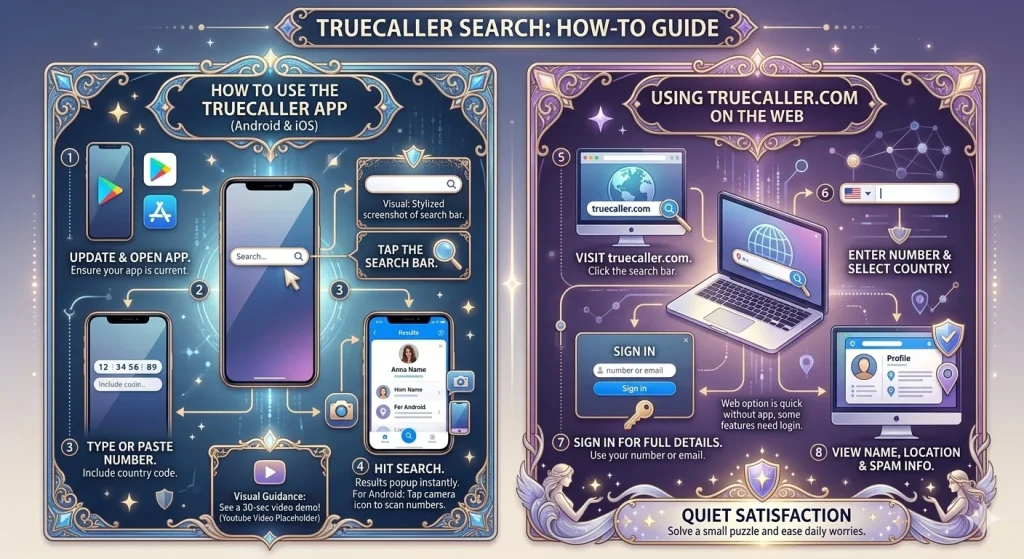
Getting started with Truecaller phone number search is straightforward and takes under a minute. Here’s how it goes on different platforms.
On the Truecaller App (Android or iOS)
- Open the Truecaller app—make sure it’s updated from the Play Store or App Store.
- Tap the search bar at the top of the home screen.
- Type or paste the phone number, including the country code.
- Hit search. Results pop up instantly if matched.
For Android users, there’s a handy scanner: tap the camera icon in the search bar to scan a number from a photo or screen.
(Visual: Screenshot of the Truecaller app search bar—makes the steps easier to follow for beginners.)
(Suggestion: Embed a 30-second YouTube video demo here for visual guidance.)
On the Truecaller Website
- Head to official website and click the search bar.
- Enter the number and select your country.
- Sign in with your number or email for full details.
- View the name, location, and spam info.
This web option is great for quick checks without the app, though some features need login. Many people feel a quiet satisfaction after the first successful search—like solving a small puzzle that eases daily worries.
What Details Can You See in a Truecaller Phone Number Search?
A Truecaller phone number search reveals practical info to help you decide on the call. You’ll typically see the caller’s name (if tagged), general location like city or country, and a spam risk level—green for safe, red for high alert.
Extra bits include business type (e.g., bank or delivery), recent user reports, and for premium users, comments or call frequency. Searches often highlight local scams or service numbers, bringing a sense of local awareness. Not every number shows up—privacy settings or low reports mean “no match”—but when it does, it feels like a helpful nudge toward smarter choices.
Real-world example: Imagine getting a call from an unknown number during lunch. Truecaller shows “Pizza Delivery” with a low spam score. You answer with confidence, avoiding that awkward “wrong number” moment. Want to know if that unknown number is a delivery service or a scam? Truecaller phone number search shows the name, location, and spam score instantly, making it easier to answer confidently or block without second-guessing.
Is Truecaller Phone Number Search Free or Premium?
Truecaller phone number search is mostly free, which is why so many turn to it daily. Basic lookups give you the name, location, and spam flag without cost. This free tier covers most everyday needs, like checking a missed call from an unknown area code.
Premium steps it up with unlimited searches, who-viewed-my-profile alerts, and ad-free use. It costs around $4-5 monthly, depending on your region, and feels worth it for heavy users tired of limits. For casual searches, the free version delivers solid value, easing that nagging uncertainty without extra spend. Check out truecaller premium features
Privacy and Safety Tips for Truecaller Phone Number Search
Using Truecaller phone number search raises valid questions about your own data, and that’s normal—many feel a mix of curiosity and caution. The app’s database comes from shared contacts, so your number might appear if friends have you saved.
To protect yourself, head to the Privacy Center in the app. Toggle off profile visibility or require approval for searches. These tweaks add extra reassurance. Always search ethically—it’s for identification, not spying. Truecaller encrypts data and lets you unlist easily, turning potential worry into informed peace.
User story: “After a few searches, I realized my own number showed up. Unlisting it gave me that quiet relief—like closing a door on unwanted eyes,”
Tips for Better Results from Truecaller Phone Number Search
To get the most from Truecaller phone number search, a few habits make a big difference. Use the full international format for accuracy, especially for +92 numbers.
Search right after a call for fresh data, as the database updates constantly. If results are vague, try the app’s dialer integration—it auto-searches as you type. For iOS users, the new Live Caller ID in iOS 18+ shows previews before answering, adding that anticipatory calm. These small steps turn occasional frustration into reliable insights.
Enter the number. Hit search. Done. Results appear in seconds.
Advanced Truecaller Phone Number Search Tips
For advanced users:
- Combine searches with custom filters in the app.
- Use VPNs for searches in restricted regions.
- Export search history for personal records.
These options create a more powerful, personalized experience.
Common Issues and Fixes for Truecaller Phone Number Search
Truecaller phone number search isn’t perfect, and hiccups happen. “No results” often means the number isn’t in the database yet—try again later or report it.
Login errors? Double-check permissions for contacts and SMS.
Slow searches? Switch to Wi-Fi or clear app cache.
In areas like Punjab, network issues can delay things, but a quick restart usually helps. These fixes keep the tool dependable, sparing you the irritation of dead ends.
No results? Report the number to help the community—takes 10 seconds and improves accuracy for everyone.
Alternatives to Truecaller Phone Number Search
If Truecaller phone number search doesn’t fit, other options exist. Google search with the number in quotes often pulls public listings or business pages. Apps like Hiya or RoboKiller offer similar reverse lookups with strong spam focus.
For deeper checks, sites like NumLookup or Whitepages provide free basics, though less community-driven. Each has its feel—Truecaller’s crowdsourced edge shines for real-time spam, but trying alternatives can bring that exploratory satisfaction when one tool falls short.
Comparison: Truecaller excels with its massive database, while Hiya is lighter on battery and RoboKiller adds audio challenges for bots. Some popular alternatives to Truecaller phone number search include Hiya, RoboKiller, and NumLookup, each offering unique features like lighter battery use or audio challenges for bots.
Frequently Asked Questions (FAQs)
Final Thoughts
Truecaller phone number search has a way of turning those anxious unknown calls into moments of clarity. It’s not just a tool—it’s that small comfort in a world of endless pings. Whether you’re dodging scams or reconnecting with old contacts, it puts power back in your hands. Give it a try next time that unfamiliar number lights up your screen, and feel the difference for yourself. Your experiences matter—share them in the comments below! For the latest scripts, tips, and giveaways, join our community or check the official Truecaller Discord server. Ready to try Truecaller phone number search? Download the app now and take control today!
Have you used Truecaller phone number search to identify a caller? Drop a comment below and let us know your favorite tips! Now that you’ve learned how to use Truecaller phone number search, it’s time to take control of your calls. Join our community for the latest tips, privacy updates, and giveaways!